Installation
Download generic.dll (Windows) or generic.so (Linux).
Put it into Global Plugins folder or Personal Plugins folder (they are specified into Help / About Wireshark / Folders).
If there is an epan sub-directory into the choosen folder, put the dll/library in it instead.
Put the following files into a directory.
example_with_capture.wsgd : protocol name, parent dissector ...
example_with_capture.fdesc : data format description
The directory could be :
- any directory if you set a environment variable : WIRESHARK_GENERIC_DISSECTOR_DIR = <directory where are example_... files>
- wireshark profiles directory (e.g. C:\Users\<user>\AppData\Roaming\Wireshark\profiles)
- wireshark data directory (e.g. C:\Users\<user>\Documents)
- wireshark plugin directory (e.g. C:\Program Files (x86)\Wireshark\plugins\2.6\epan)
- wireshark main directory (e.g. C:\Program Files (x86)\Wireshark)
Usage
Posted on 27/10/2007 by UserName
Run wireshark using example_with_capture.pcap
↓
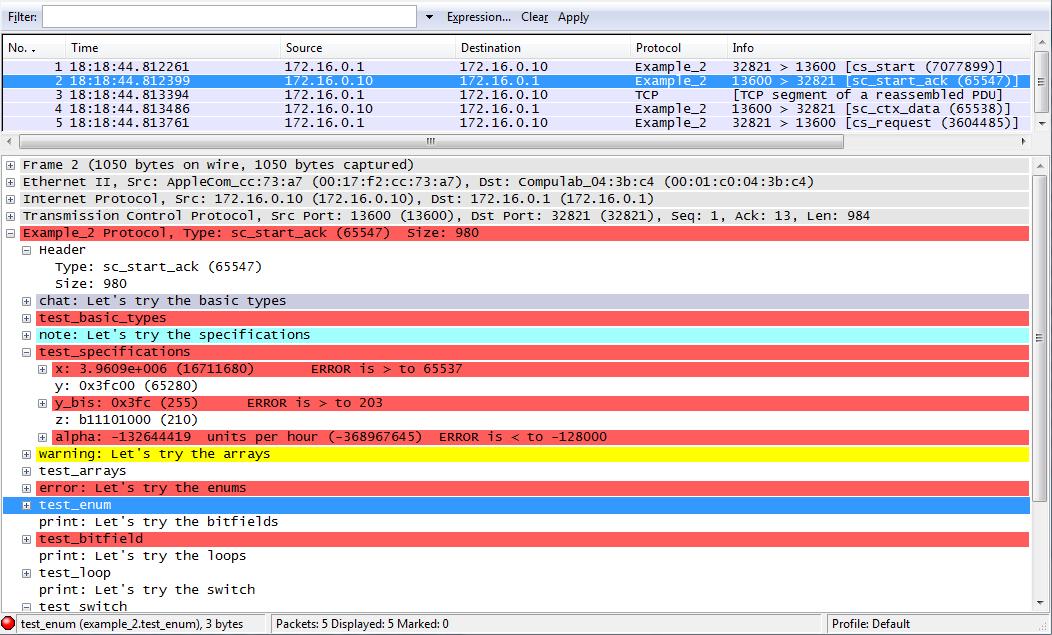
Change PARENT_SUBFIELD and PARENT_SUBFIELD_VALUES (into *.wsgd) to test your data.
Add a new file xxx.wsgd (into the SAME directory) to define another protocol.