Rules
- Define a type before using it
- For type name and field name :
--- Use only alphanumerics and _
--- Do not start with number
--- Do not use keywords (int8, string, void, any, this, struct, enum, if, while ...)
--- Do not use global or pinfo
Basic types
- spare                                     byte not displayed and not usable
- char, schar, uchar
- bool1, bool8, bool16, bool32              take care of byte order
-  int2 to  int32,  int40,  int48, int64    take care of byte order
- uint1 to uint32, uint40, uint48           take care of byte order
- float32, float64                          take care of byte order
- string, string(<nb_bytes>)                manage zero as end of string
- string_nl, string_nl(<nb_bytes>)          idem string + manage "\n" or "\r\n" as end of string
- raw(<nb_bytes>)                           bytes displayed as hexa dump and not usable by wsgd
                                            must start on an entire byte position
                                            nb_bytes could be * in some cases
- padding_bits                              permits to move to the next entire byte position
No Statement value
<int_or_float_type_name>{ns=<No Statement value>}       <field_name> ;
If the read value is equal to the specified value :
- No_Statement will be displayed.
- Transform, Display and Constrains specifications are ignored
NB: must be specified before the Transform, Display and Constrains specifications.
Transform specifications
<int_or_float_type_name>{q=<quantum>:o=<offset>}        <field_name> ;
<int_or_float_type_name>{q=<quantum>}                   <field_name> ;
<int_or_float_type_name>{o=<offset>}                    <field_name> ;
The resulting value = read_value * quantum + offset.
Quantum and offset values could be specified with an expression (without variable), e.g : 3.1415927/180.0

<type_name>{tei=integer expression (use "this")}        <field_name> ;
<type_name>{tef=float   expression (use "this")}        <field_name> ;
The specified expression must return the appropriate type.
E.g:
uint16{tei=2*this-47}          <field_name> ;    # since this is an integer, the expression gives an integer
uint16{tef=2*this-47.0}        <field_name> ;    # because of 47.0, the expression gives a float
float32{tef=2*this-47}         <field_name> ;    # since this is a float, the expression gives a float

<type_name>{tei=a_previous_field > 0 ? this/another_field : 2*this-47}    <field_name> ;
<type_name>{tef=a_function_which_returns_a_float(this)}                   <field_name> ;
Display specifications
<int_type_name>{d=hex}                                  <field_name> ;
<int_type_name>{d=oct}                                  <field_name> ;
<int_type_name>{d=bin}                                  <field_name> ;
<any_type_name>{d=printf format %22.32s}                <field_name> ;
<any_type_name>{de=string expression (use "this")}      <field_name> ;
NB: display specifications must always appears AFTER transform specifications (if any)
Constraint specifications
An error is displayed if the value does NOT match.
For int or float only.
<int_or_float_type_name>{min=<val_min>:max=<val_max>}   <field_name> ;
<int_or_float_type_name>{min=<val_min>}                 <field_name> ;
<int_or_float_type_name>{max=<val_max>}                 <field_name> ;
NB: constraints specifications must always appears AFTER transform and display specifications (if any)
Min and max values could be specified with an expression (without variable), e.g : -(3.0/4)*3.1415927

Could use many constaints (specified in the good order), e.g:
uint6{min=2:max=9}{min=12:max=19}
Local byte order specification
The global byte order is specified with byte_order command.
This byte order specification apply only to the specified field.
<type_name>{byte_order=big_endian}      <field_name> ;
<type_name>{byte_order=little_endian}   <field_name> ;
Arrays
<type_name>[12]                                <array_field_name> ;
<type_name>[<field_name>]                      <array_field_name> ;
<type_name>[<field_name> - 12]                 <array_field_name> ;
<type_name>[<field_name> < 36 ? 0 : 16]        <array_field_name> ;

Only at the end of the message AND if Generic Dissector knows the size of the message (look at this) :
<type_name>[*]                                 <array_field_name> ;          * means any number of element
<type_name>[+]                                 <array_field_name> ;          + means any number of element, at least 1
If the array is not at the end of the message, look at loop_size.
Alias
alias  <new_type_name>    <already_existent_type_name> ;
alias  <new_type_name>    <already_existent_type_name>{q=<quantum>}{min=<val_min>:max=<val_max>} ;
alias  <new_type_name>    <already_existent_type_name>{d=hex}{min=<val_min>:max=<val_max>} ;
Enum
Take care of byte order
enum<nb_bits 1 to 32>  <enum_type_name>
{
    <symbolic_value_name>  <integer_value or - >                   # - means last value + 1 (zero if first value)
    ...
}

# To define an identic enum with a different size.
enum<nb_bits 1 to 32>  <enum_type_name>  as      <already_existent_enum_type_name> ;

# To define a new enum starting from an existent one.
enum<nb_bits 1 to 32>  <enum_type_name>  expand  <already_existent_enum_type_name>
{
    <other_symbolic_value_name>  <integer_value>
    ...
}

# Could use <enum_type_name>::<symbolic_value_name> in any expression/condition.
Bit field
bitfield must be understood like a C bitfield (even there is no standard about its implementation).
Take care of byte order.
Fields could be unsigned integers, bool1 or enum (without signed values).
bitfield<nb_bits 8 16 24 or 32>  <bitfield_type_name>
{
  uint3{d=bin}                             field1 ;             # lower level bits
  hide uint2                               field2_unused ;
  uint15{q=2.34:o=-117.35}{min=-105.17}    field3 ;
  <enum_type>                              field4 ;
  bool1                                    field5 ;
  ...                                                           # higher level bits
}
Could also use var and set inside Bit field.
More info
Struct
struct  <struct_type_name>
{
    <type_name>     <field_name> ;
    <command_name>  <command_parameter> ;
    if              ((<field_name> + 20 < 572) && (...) || (...))
    {
        <anything that could be specified in a struct>
    }
    else
    {
        <anything that could be specified in a struct>
    }
    while           ((<field_name> % 20 < 2**3) && (...) || (...))
    {
        <anything that could be specified in a struct>
        continue ;
        break ;
    }
    do
    {
        <anything that could be specified in a struct>
        continue ;
        break ;
    } while           ((to_string(<field_name>) + "20" != print("%d", 572)) && (...) || (...)) ;

    # repeat until the given size have been effectively read
    # Use loop_size_bits if bit size is needed
    loop_size_bytes    <field_name>+20
    {
        <anything that could be specified in a struct>
        continue ;
        break ;
    }

    # Inline struct and bitfield
    struct
    {
        <anything that could be specified in a struct>
    }   <field_name> ;

    bitfield<nb_bits 8 16 24 or 32>
    {
        <anything that could be specified in a bitfield>
    }   <field_name> ;
    ...
}

Optionaly, you can put a print specification :
struct  <struct_type_name>  print (<printf format and arguments>)
{
    ...
}
The printf arguments could be fields specified inside the struct.
Switch
switch  <switch_type_name>  <optional and deprecated switched_type_name>
{
    case <integer, enum or string value 1> :
    <anything that could be specified in a struct>
    ...
    case <integer, enum or string value n> :
    <anything that could be specified in a struct>
    default :
    <anything that could be specified in a struct>
}

# Example with enum :
enum16 T_Operation
{
  CREATION      0
  MODIFICATION  1
  DELETION      2
}
switch T_Operation_switch  # T_Operation
{
case  T_Operation::MODIFICATION  : print ("MODIFICATION value");
case  T_Operation::DELETION      : print ("DELETION value");
case  T_Operation::CREATION      : print ("CREATION value");
default                          : print ("default value");
}
struct  xxx
{
  ...
  T_Operation                   operation;
  ...
  T_Operation_switch(operation)  oper_switch;
  # or
  T_Operation_switch(operation)  "";
  # or directly inline without previous definition/declaration
  switch(operation)
  {
  case  T_Operation::MODIFICATION  : print ("MODIFICATION value");
  case  T_Operation::DELETION      : print ("DELETION value");
  case  T_Operation::CREATION      : print ("CREATION value");
  default                          : print ("default value");
  }
}

# Example with string :
switch T_string_switch
{
case  ""         : print ("empty value");
case  "str1"     : print ("str1 value");
case  "WEFZ  AS" : print ("WEFZ  AS value");
default          : print ("default case");
}
struct  xxx
{
  ...
  T_string_switch("a string value")    string_switch;
  T_string_switch(a_string_field)      string_switch;
  T_string_switch(a_string_variable)   string_switch;
  ...
}
Switch with expression
switch_expr  <switch_type_name>
{
    case (<any expression>) :    <anything that could be specified in a struct>
    ...
    case (<any expression>) :    <anything that could be specified in a struct>
    default                 :    <anything that could be specified in a struct>
}

# Example :
switch_expr T_switch_expr
{
case  (a_field >  10 && a_variable != 0)  : print ("1st case");
case  (a_field <= 10 && a_variable != 0)  : print ("2nd case");
case  (a_variable == 0)                   : print ("3rd case");
case  (a_string_variable == "hello")      : print ("hello case");
default                                   : print ("default case");
}
struct  xxx
{
  ...
  T_switch_expr  my_switch;
  # or directly inline without previous definition/declaration
  switch_expr
  {
    ...
  }
}
Forward declarations
- enum<nb_bits 1 to 32>  <enum_type_name>;
- bitfield<nb_bits 8 16 24 or 32>  <bitfield_type_name>;
- struct  <struct_type_name>;
- switch  <switch_type_name>;
Commands
- include     <file_name> ;
  include the specified description file
  Not available inside a struct, switch ...
- byte_order  (little_endian | big_endian | as_host) ;
  specify the data byte order for int (also enum and bitfield) and float
  - big endian (also known as network, motorola) : the bytes are not inverted
  - little endian (also known as intel) : the bytes are inverted
Var command
var  <type>  <variable name> = <value or expression> ;
 permits to declare, initialize and display a variable.
 variable = field except it is initialized from expression and not from the captured packet.
 <type> could be any int, float, string and enum
E.g:
var string                          str = "Hello world!";
var string[2]                       str_array = "Hello both world!";
var uint32{q=3}{d=the int=0x%04x}   integer = 23;
var float32                         flt = 136.234;
var float32[2]                      flt_array = 136.136;
var string                          str2 = print("flt = %3f and integer = ", flt) + to_string(integer);
var <an enum type>                  oper = <an enum type>::<symbolic name>;
var uint8{d=bin}                    integer_bit_1     =  integer & 0x01;
var uint8{d=bin}                    integer_bit_2_3   = (integer & 0x06) >> 1;
The variable must NOT already exist.
Set command
set  <variable name> = <expression> ;
E.g:
set    Size = 0xa * 3 + 3 ;
set    Size = Size-10 ;
set    Size_bit_part = (Size & 0xc) >> 2;
The variable must already exist.
The variable could be a field (but does NOT change the value seen by wireshark).
Const command
const  <type>  <variable name> = <value or expression> ;
 permits to declare and initialize a constant.
 <type> could be any int, float, string and enum
Constants must be named with "::".
Constants could NOT have/be :
- array,
- specifications no_statement, transform, display, constrains ...
- struct, switch, ...
E.g:
const uint16           konst::int = 2;
const string           konst::str = "abcdefgh - abcdefgh";
const T_Type_message   konst::enum = T_Type_message::cs_start;
const float64          Math::PI = 3.1415927;
const float64          Math::deg_to_rad = Math::PI / 180;
const string           konst::str_fct = string.replace_all (konst::str, "bc", "xyz");
The constant must NOT already exist.
Built-in constants :
  system::os      = "win" or "linux"
  system::bits    = 32 or 64
  system::osbits  = "win32" ... "linux64"

  shark::progfile_dir     = "C:\wireshark\dev\svn_sources_release-1.8--win32\wireshark-gtk2"
  shark::plugin_dir       = "C:\wireshark\dev\svn_sources_release-1.8--win32\wireshark-gtk2\plugins\1.8.3"
  shark::datafile_dir     = "C:\wireshark\dev\svn_sources_release-1.8--win32\wireshark-gtk2"
  shark::systemfile_dir   = "C:\wireshark\dev\svn_sources_release-1.8--win32\wireshark-gtk2"
  shark::profiles_dir     = "C:\Users\Olivier\AppData\Roaming\Wireshark\profiles"
  shark::persdatafile_dir = "C:\Users\Olivier\Documents"
Variable/field name usage
When you want to use a variable or field inside an expression or set command, you simply use its name.
But it could happen that there is many variables/fields with the same name.
In these cases, you can use the full name or the partial ending name.
E.g. :
struct time
{
  uint32  value;
  var uin16 sec = ...;
  var uin16 min = ...;
  ...
}
struct T_my_msg
{
  ...
  struct {
    ...
    time    expected_time;
  }  expected_data ;
  struct {
    ...
    time    time;
  }  measured_data ;
  # "value" means the last variable/field called "value", so it is "measured_data.time.value"
  if (value != expected_data.expected_time.value)  { ... }    # full name
  if (value !=               expected_time.value)  { ... }    # partial ending name
}
Functions
function  <return_type>  <function_name> (<direction> <type>  <name> [ = <default_value> ], ...)
{
  <anything that could be specified in a struct>
  ...
  return  <expression>;
}

<direction>      = in, out, in_out
<type>           = any existing simple type (numeric or enum or string) or any
<return_type>    = <type> or void
<default_value>  = default value used if parameter is not specified
NB: if a default value is specified on a parameter, then all following parameters must have a default value.

E.g.:
function string  sec_to_dhms (in int64{min=0}  value)
{
  hide var int64    value_work = value;
  hide var uint16   sec = value_work % 60;
       set          value_work = (value_work - sec) / 60;
  hide var uint16   min = value_work % 60;
       set          value_work = (value_work - min) / 60;
  hide var uint16   hour = value_work % 24;
       set          value_work = (value_work - hour) / 24;
  hide var uint16   days = value_work;
  return  print("%d days %02d:%02d:%02d", days, hour, min, sec);
}
function string   ms_to_dhms (in int64{min=0}  value)
{
  hide var int64    value_work = value;
  hide var uint16   ms = value_work % 1000;
       set          value_work = (value_work - ms) / 1000;
  hide var string   str = sec_to_dhms(value_work) + print(".%03d", ms);
  return  str;
}
...
  int64          milli_sec_time;
  var string     milli_sec_time_str = ms_to_dhms(milli_sec_time);
  # or
  int64{de=ms_to_dhms(this)}       milli_sec_time;

NB: a function which returns void (ie nothing) must be called like this :
  call  <function_name> (<the parameters>);

NB: All variable/fields created during a function are erased at the end of the function.
    They are still visible/usable inside wireshark,
     but you can NOT use them into fdesc format description.
Built-in functions
- string          to_string (<field_variable_value_expression int/float/string>) ;
- <int_or_float>  to_numeric (in string  str_containing_numeric_expression) ;
  fatal if result is not numeric
- <float>         to_float (in string/int  numeric_expression) ;
  fatal if result is not numeric
- <int>           to_integer (in string/float  numeric_expression, in int8  base = 0) ;
  fatal if result is not numeric
- string getenv (in string env_variable_name) ;
- string          date.get_string_from_days    (in uint16{min=1583} ref_year, in uint32 number_of_days);
- string          date.get_string_from_seconds (in uint16{min=1583} ref_year, in uint40 number_of_seconds);
  so, if you have unix time (seconds since 1970/01/01) use : date.get_string_from_seconds(1970, unix_time);
- uint            string.length (in string  str_source);
-  int64          string.find   (in string  str_source, in string  str_to_find);    # returns string::npos if not found
- string          string.substr (in string  str_source, in uint  index, in int64  count = string::npos);
- string          string.erase  (in string  str_source, in uint  index, in int64  count = string::npos);
- string          string.insert (in string  str_source, in uint  index, in string str_to_insert);
- string          string.replace(in string  str_source, in uint  index, in int64  count, in string  str_to_insert);
- string          string.replace_all(in string  str_source, in string  str_old, in string  str_new);
Decoder
Sometimes, the input data is NOT directly usable (using int16, string ...) because it is encoded in a way that Generic dissector does NOT understand.
It is necessary to decode the input data before use it.
With decoder command, you can provide a function which decode the data following your rules.
Decoder
Decoder could append more data than asked
internal_frame
Decoder and internal_frame data reading rules
Built-in decoders :
- decoder_aes (ecb only) key (16/24/32 bytes) must be specified by ascii string variable "decoder_aes_key", you must read the possible padding bytes
- decoder_base64 ignore space, tab, CR, LF
- decoder_utf8
- decoder_utf16be (big endian)
- decoder_utf16le (little endian)
Specific commands
- output            -- or ++ ;
  modify the output level

- save_position          <position_name> ;
  save the current data packet position
- goto_position          <previously_saved_position_name> ;
- move_position_bytes    <position_offset> ;
- move_position_bits     <position_offset> ;

- [debug_]print  "<string>" or <field name> or ("<printf format string>", <expression>, <expression> ...) ;
- chat           "<string>" or <field name> or ("<printf format string>", <expression>, <expression> ...) ;
- note           "<string>" or <field name> or ("<printf format string>", <expression>, <expression> ...) ;
- warning        "<string>" or <field name> or ("<printf format string>", <expression>, <expression> ...) ;
- error          "<string>" or <field name> or ("<printf format string>", <expression>, <expression> ...) ;
- fatal          "<string>" or <field name> or ("<printf format string>", <expression>, <expression> ...) ;
  print the specified string or the specified field value or printf
  chat, note and warning will appear on gray, blue and yellow lines
  error and fatal will declare an error and appear on red line
  colored lines will appear into "Analyze/Expert info composite" menu
  fatal is supposed to stop the dissection

- [debug_]print  (byte_order|output|position) ;
  print specified internal data
Others commands
WITHOUT any effect on wireshark at this time.
- check_eof_distance_bytes  <number of bytes before end of data> ;
- check_eof_distance_bits   <number of bits  before end of data> ;
  verify the distance between the current position and the end of packet
- [debug_]print  (alias|struct|enum|switch) ;
  print specified internal data
- [debug_]print  all ;
  print all internal data specified above
- [debug_]print  (help | syntax) ;
Modifiers
- hide   <any_type>       <any_field> ;
  permits to hide the field/variable (NOT displayed and could NOT filter on it)
Wireshark pinfo data
Only if you have specified MANAGE_WIRESHARK_PINFO into <file>.wsgd.
This is specific Wireshark internal data.
Use "print pinfo.*;" to know which pinfo data are available.
The available pinfo data could change depending on the wireshark version.
E.g:
- pinfo.srcport, pinfo.destport, pinfo.match_port
- pinfo.current_proto
- pinfo.fd.num
- pinfo.fd.pkt_len, pinfo.fd.cap_len
- pinfo.fd.abs_ts, pinfo.fd.rel_ts
- ...
NB: modify (with set command) these variables does NOT change wireshark values.
Sub dissector/protocol types
Only if you have specified SUBFIELD into <file>.wsgd.
  <subfield type>            <subfield name> ;
  subproto(<nb_bytes>)       <field_name> ;               must start on an entire byte position
  # or
  insproto(<nb_bytes>)       <field_name> ;               must start on an entire byte position
This permits to specifiy which data is give to the sub protocol.
The sub dissector/protocol could also be called explicitely :
  subproto(<nb_bytes>){dissector=<proto abbrev name>}   <field_name> ;     must start on an entire byte position
  # or
  insproto(<nb_bytes>){dissector=<proto abbrev name>}   <field_name> ;     must start on an entire byte position
In this case, SUBFIELD is not necessary.
subproto insproto
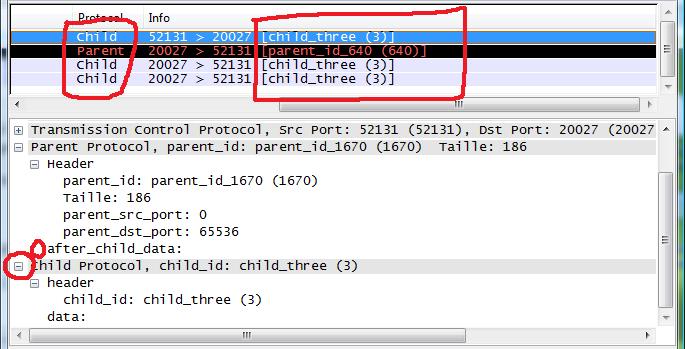
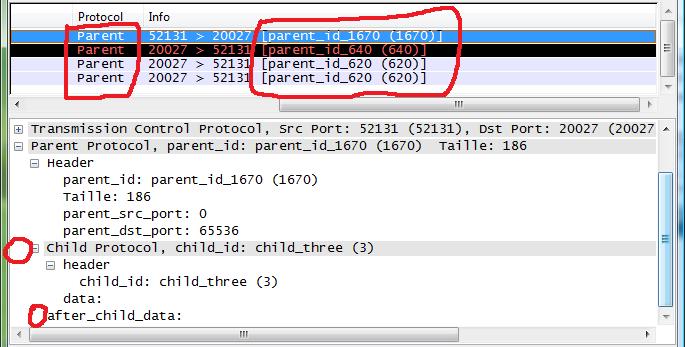
Example : mux.wsgd mux.fdesc and subproto mux_over.wsgd mux_over.fdesc